How to Apply for Solar Subsidy in Tamil Nadu
September 22, 2026 · Updated October 26, 2026 | Karthikeyan E, R K Solar Solutions | Solar Subsidy, PM Surya Ghar
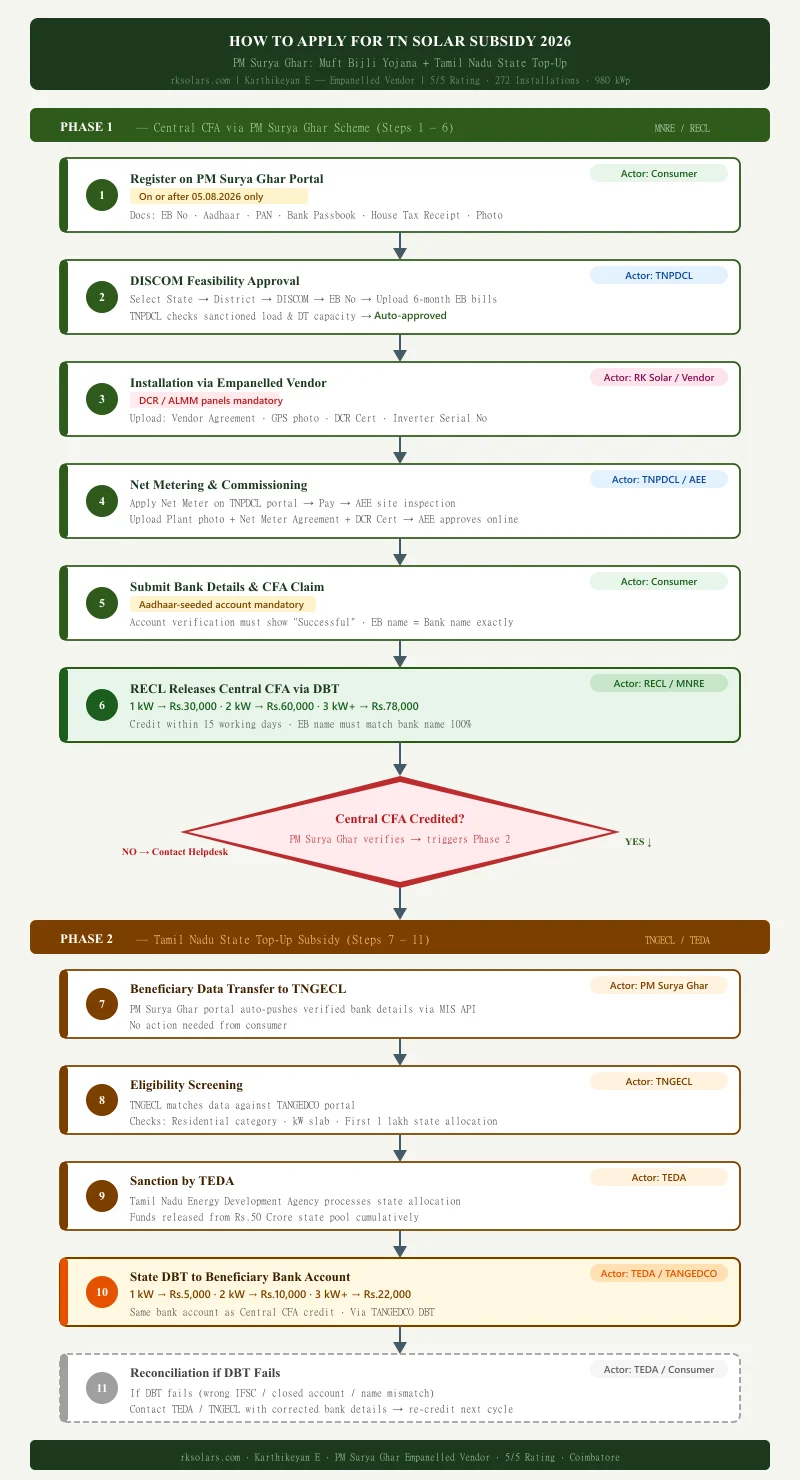
Getting the full TN solar subsidy in 2026 means completing two separate processes, the PM Surya Ghar central CFA and the Tamil Nadu state top-up, in the right order. For a 3 kW installation, the combined total is up to Rs.1,00,000 in direct bank credit: Rs.78,000 from the central government and Rs.22,000 from Tamil Nadu state. This guide walks through all 11 steps, from PM Surya Ghar registration to the state payment.
The amounts for 1, 2 and 3 kW and what you pay after both subsidies are on our rooftop solar subsidy page; this page is only about the process.
Two government portals are involved, and they do not share records with each other. Keep both application numbers; you will need them at every call and every office visit.
The two portals, and what each one is for
| Portal | What you do there |
|---|---|
| pmsuryaghar.gov.in (central scheme, MNRE) | Registration, feasibility request, choosing the vendor, bank details, the subsidy claim, and the central subsidy status. Sign in with your mobile number under Consumer Login. |
| tnebltd.gov.in/usrp (TNPDCL Solar Roof Top Portal, formerly TANGEDCO) | Net meter application and payment, the PCR upload (agreements, DCR certificate, PAN card, geo-tagged photo), the state subsidy details, and the TNPDCL application status by application number or mobile. |
| 15555 | PM Surya Ghar toll-free helpline. Keep your application number ready. |
Your TNPDCL application number and your PM Surya Ghar registration are two different records. One portal does not show the other, so a delay has to be traced on the portal where that stage lives.
Documents to keep ready before you start
| Document | Where it is used | Watch out for |
|---|---|---|
| EB consumer number (your electricity bill) | Both portals | The consumer name on the bill must match your bank account name letter for letter |
| Aadhaar | PM Surya Ghar registration, bank seeding | The bank account must be seeded to this Aadhaar |
| PAN card | PM Surya Ghar registration; uploaded again on the TNPDCL portal for the state subsidy | Keep a clear PDF scan |
| Bank passbook or cancelled cheque | Subsidy payment (DBT) | Central and state amounts go to this same account |
| Passport-size photo | Registration | |
| House tax receipt | Registration (proof the house is yours) | |
| Last six months of EB bills | Feasibility request |
Phase 1: Central CFA — PM Surya Ghar Scheme (Steps 1–6)
Step 1: Register on PM Surya Ghar Portal (On or After 05.08.2026)
Register on pmsuryaghar.gov.in on or after 05.08.2026. Earlier registrations do not qualify for the revised CFA amounts. Keep these documents ready: EB Number, Phone No, Email ID, Customer Photo, Bank Passbook or Cheque leaf, Aadhaar, PAN, and House Tax Receipts.
The most critical rule: the consumer name on your EB bill must match your bank account name exactly — one spelling difference will get your subsidy returned by the system.
Step 2: DISCOM Feasibility Approval (TNPDCL Load & DT Check)
TNPDCL checks your sanctioned load and the capacity of the Distribution Transformer (DT) in your area before approving. Enter: State → District → DISCOM → EB Service Number → Fetch Data. Then on the My Application page: choose Residential, enter Latitude & Longitude, upload last 6-month EB bills, and submit. TNPDCL auto-approves feasibility. To judge which size your load and transformer allow, see how to choose a system for your home.
Step 3: Installation via Empanelled Vendor (DCR / ALMM Modules Only)
DCR (Domestic Content Requirement) and ALMM-listed solar panels are mandatory. Non-DCR panels mean the subsidy is rejected at source. RK Solar Solutions installs only DCR compliant, ALMM-certified solar panels as an empanelled solar vendor on PM Surya Ghar. What each part of a quote must carry is listed in what a solar quote includes.
After installation, upload on the portal: National Consumer Vendor Agreement (on Rs.100 stamp paper), GPS plant photo, DCR Certificate, and Inverter Serial Number.
Step 4: Net Meter Application on the TNPDCL Portal (formerly TANGEDCO)
Apply for the net meter on the TNPDCL solar portal and pay the fee. Then tell your section AEE that the plant is installed. The AEE inspects the installation and approves the application on the portal; that approval is what releases the PCR upload link described below. After the upload the section fixes the net meter and the AEE records the commissioning online. The charges and export rates that apply once the meter is running are in our net metering rules guide.
Step 5: Submit Bank Details & CFA Claim (Aadhaar-Seeded Account)
Your bank account must be Aadhaar-seeded before submitting. MNRE pays via DBT only to Aadhaar-linked accounts. Non-seeded accounts are automatically rejected by the system. Fill bank details on the PM Surya Ghar portal. Account verification must show “Successful” before submitting.
Step 6: RECL Releases Central CFA (DBT: Rs.30,000 / Rs.60,000 / Rs.78,000)
RECL checks EB consumer name, Aadhaar, and bank details. Credit arrives within 15 working days. Check your application status by signing in at pmsuryaghar.gov.in with your registered mobile number. EB name and bank name must match 100%.
| System Size | Central CFA (MNRE / RECL) | TN State Top-Up (TEDA) | Total Subsidy |
|---|---|---|---|
| 1 kW | Rs.30,000 | Rs.5,000 | Rs.35,000 |
| 2 kW | Rs.60,000 | Rs.10,000 | Rs.70,000 |
| 3 kW & Above | Rs.78,000 | Rs.22,000 | Rs.1,00,000 |
*Central subsidy as per PM Surya Ghar: Muft Bijli Yojana guidelines. TN State top-up as per G.O. (Ms) No. 102 dated 19.09.2026.
PCR upload on the TNPDCL portal
PCR is the upload TNPDCL asks for once the section AE has approved your net meter application. The portal never spells the letters out; installers read it as project completion report, and the page itself is now titled “Net meter Agreement, Plant photo, DCR and State subsidy Details-Upload” (the upload page). Whatever it is called, it is the same thing: proof that the plant is built, so the section office can fix the meter.
Who gets the link, and when. The link comes by SMS to the customer’s registered mobile number, not to the installer. In our jobs it arrives three to five days after installation, once the local AE has approved the application on the portal. The link does not expire, but nothing moves until the upload is done, so do it the day it arrives.
What to upload
| Document | Format | Why TNPDCL wants it |
|---|---|---|
| Signed net meter agreement and the consumer–vendor agreement | The record of your connection | |
| DCR certificate for the modules | Confirms the panels use Indian-made cells and modules, a condition of the subsidy | |
| PAN card | Needed for the Tamil Nadu state subsidy | |
| Geo-tagged photo of the plant | JPG | Shows the panels at the registered address, with the location in the photo data |
We have not run into a file-size limit on this page. Keep each PDF clear enough to read on a phone.
What happens after the upload. The section office fixes the net meter, in our experience five to ten days later depending on meter stock at that office. The AE then records the commissioning on the portal, and that date is what the central subsidy claim in Step 5 is checked against. If the upload is not done, the meter is not fixed, and neither subsidy starts.
Most of our customers forward the SMS to us and we do the upload together on a call. Have the four documents scanned before installation day so the upload does not wait for a scan.
What RECL means on your subsidy status
RECL is REC Limited, the central public-sector company that MNRE has made the national implementing agency for PM Surya Ghar. Once TNPDCL has recorded the commissioning and you have submitted the subsidy claim, RECL checks three things: the consumer name on the EB bill against the bank account name, whether the account is Aadhaar-seeded, and the DISCOM inspection record. If all three pass, it releases the central amount, Rs 30,000, Rs 60,000 or Rs 78,000, to the account within 15 working days.
When your dashboard or an SMS mentions RECL, that is the stage it refers to: the claim is with the paying agency, not with the state. For a delay at this stage, call the PM Surya Ghar helpline, 15555, with your application number.
The Crucial Gate: Central CFA Credited?
The PM Surya Ghar portal verifies the RECL credit and only then pushes your data to TNGECL. This gate controls the start of Phase 2 — no central CFA credit means no state subsidy trigger. If credit is delayed, contact the PM Surya Ghar helpdesk with your Application Number. For full details on the state scheme: View G.O.102 Details →
Phase 2: Tamil Nadu State Top-Up Subsidy (Steps 7–11)
Step 7: Beneficiary Data Transfer to TNGECL
After the central CFA is credited, the PM Surya Ghar portal passes your verified details to TNGECL. No action is needed from you at this stage.
The state subsidy is tracked on the TNPDCL solar portal: open Application Status and enter your TNPDCL application number or mobile number. If the portal asks you to update state subsidy details (registrations after 5 August 2026), do it there with the same PAN and bank details.
Step 8: Eligibility Screening (Residential — First 1 Lakh Beneficiaries)
TNGECL matches your PM Surya Ghar data with the TANGEDCO portal. It confirms eligibility for solar panel subsidy in Tamil Nadu by checking: residential category, kW slab, and whether your application falls within the first 1,00,000 eligible beneficiaries from the state allocation.
Step 9: Sanction by TEDA
TEDA (Tamil Nadu Energy Development Agency) processes the funds from the Rs.50 Crore state allocation for all eligible consumers. This is an internal government step — no consumer action required.
Step 10: State DBT to Beneficiary (Rs.5,000 / Rs.10,000 / Rs.22,000)
The TN State subsidy is transferred via DBT to the same bank account where your MNRE central CFA was credited:
- 1 kW system — Rs.5,000
- 2 kW system — Rs.10,000
- 3 kW and above — Rs.22,000
Step 11: Reconciliation if DBT Fails
If DBT fails — wrong IFSC, closed account, or name mismatch — TEDA starts a reconciliation process. Contact TEDA or TNGECL with corrected bank details. Re-credit happens in the next disbursement cycle. Grievance: pmsuryaghar.gov.in → Help & Support.
How to Check Your Subsidy Status
Central subsidy. Open pmsuryaghar.gov.in, choose Consumer Login and sign in with the mobile number you registered with. The application page shows the stage you have reached: registration, feasibility approval, vendor and installation details, net meter and commissioning, subsidy claim, subsidy credited. The claim is the last stage; once it is verified, RECL pays within 15 working days.
Tamil Nadu top-up. On the TNPDCL solar portal, open Application Status and enter the application number or your mobile number. The state amount starts only after the central credit is confirmed, so if no state entry has appeared yet, the central payment is usually still pending.
The two portals do not show each other. The TNPDCL portal does not know your PM Surya Ghar stage, and PM Surya Ghar does not know your TNPDCL stage. Check both before you call anyone. Installers can see the same stages on the vendor side of each portal, so ask your installer to check before you travel to an office.
Where applications get stuck
| Where it stops | Usual reason | What to do |
|---|---|---|
| Feasibility not approved | Sanctioned load or transformer capacity in your area | Ask the section office; a load enhancement may be needed first |
| No PCR link a week after installation | The AE has not yet approved the application on the portal | Call or visit the section office with your TNPDCL application number |
| Meter not fixed two weeks after the upload | Meter stock at the section office | Follow up with the AE; your installer can check from the vendor side |
| Subsidy claim returned | EB bill name and bank name differ, or the account is not Aadhaar-seeded | Correct it at the bank, then resubmit the claim |
| State amount missing after the central credit | State processing, or the first-1-lakh limit | Contact TEDA or TNGECL as in Step 11 |
How long each stage takes
| Stage | Typical time in our installations |
|---|---|
| Installation to AE approval and PCR link | 3 to 5 days |
| PCR upload to net meter fixed | 5 to 10 days, depending on meter stock |
| Subsidy claim to central credit (RECL) | Within 15 working days |
| Central credit to state top-up | Starts after the central credit; no fixed period is published |
These are what we see in Coimbatore; other sections can be faster or slower.
Frequently Asked Questions
Q1. What documents are required for PM Surya Ghar portal registration?
You need your EB Number, Phone No, Email ID, Customer Photo, Bank Passbook or Cheque leaf, Aadhaar, PAN, and House Tax Receipts. The consumer name on your EB bill must match your bank account name exactly. These same documents apply under the TNEB rooftop solar scheme 2026 for Tamil Nadu residents.
Q2. Why must I register on PM Surya Ghar portal on or after 05.08.2026?
The Central Government revised the CFA scheme effective 05.08.2026. Only registrations on or after this date qualify for the updated subsidy amounts under PM Surya Ghar: Muft Bijli Yojana.
Q3. Why is an Aadhaar-seeded bank account mandatory for the solar subsidy?
MNRE releases the subsidy via Direct Benefit Transfer (DBT) only to Aadhaar-linked accounts. Non-seeded accounts are automatically rejected. Check with your bank before submitting.
Q4. What happens if my TN State subsidy DBT fails?
TEDA starts a reconciliation process. Contact TEDA or TNGECL with corrected bank details — updated IFSC, account number, or name. Re-credit is processed in the next disbursement cycle.
Q5. How do I check my PM Surya Ghar subsidy status?
Sign in at pmsuryaghar.gov.in with your registered mobile number under Consumer Login and open your application. The subsidy claim is the last stage shown; RECL releases the amount within 15 working days of verification. The Tamil Nadu top-up is tracked separately under Application Status on the TNPDCL solar portal.
Q6. What is PCR upload on the TNEB solar portal?
It is the upload TNPDCL asks for after the section AE approves your net meter application: the signed agreements, the DCR certificate, your PAN card and a geo-tagged photo of the plant. The link comes by SMS to the registered mobile number three to five days after installation. The meter is fixed only after this upload.
Q7. What is RECL in the PM Surya Ghar subsidy?
REC Limited, the central agency that verifies the subsidy claim and pays the central amount to your bank. If your status mentions RECL, the claim has reached the payment stage.
Q8. Where is the Tamil Nadu solar rooftop portal?
tnebltd.gov.in/usrp, run by TNPDCL. It handles the net meter application, the PCR upload, the state subsidy details and the application status. The central scheme is on a different site, pmsuryaghar.gov.in.
Q9. Does the TNPDCL portal show my PM Surya Ghar status?
No. The two portals keep separate records. Check the central stage on pmsuryaghar.gov.in and the TNPDCL stage on the TNPDCL portal.
Sources
- PM Surya Ghar: Muft Bijli Yojana, pmsuryaghar.gov.in (scheme guidelines and consumer login)
- TNPDCL Solar Roof Top Portal, tnebltd.gov.in/usrp (net meter application, document upload, application status, FAQ)
- TANGEDCO circular on TNERC Order No. 8 of 2021, net metering procedure (Salientfeatures.pdf)
- Government of Tamil Nadu G.O. (Ms) No. 102, Energy Department, dated 19 September 2026 (state top-up)
- Timings for the PCR link and meter fixing: R K Solar Solutions installation records, Coimbatore, 2026
About the Author
Karthikeyan E runs R K Solar Solutions in Coimbatore and has been installing rooftop solar since 2011. His team files the PM Surya Ghar registration, the TNPDCL net meter application and the PCR upload for every customer, which is where the timings on this page come from. Empanelled vendor under PM Surya Ghar and with TNEB; more than 500 installations across Tamil Nadu. Learn more about Karthikeyan E →